


Photo Recovery-File Recovery
4.0128.00 Reviews
App Specs
- Version
- 1.2.3
- Updated On
- License
- Free
- Downloads
- 5,000,000+
- Developer
- Dream Tools
- Categories
- Tools
- Platform
- Android
Screenshots



 Analysis by AppCompare
Ever had that sinking feeling when you accidentally delete a photo or file that you swore was backed up somewhere? Yeah, me too. That's why I decided to give Photo Recovery-File Recovery a spin. It promises to be the ultimate lifesaver for those "oops" moments, and I was curious to see if it could really live up to the hype.
Why the first scan feels appealing
A recovery tool is easy to appreciate in the first few minutes: you open it with a problem in mind, choose a scan, and hope something useful turns up. That focused purpose is the strongest part of this app’s first impression. Rather than asking me to learn a broad file-management system, it puts recovery at the center, which is exactly what I want when I’m worried about a missing picture.
There is a useful distinction to keep in mind, though: finding a file during a scan is not the same as guaranteeing that it can be restored in a usable form. Recovery depends on what remains on the device and whether the original data has been overwritten. I treat any recovered-looking result as a candidate to inspect, not as proof that every deleted file can be brought back.
For that reason, I would use the app promptly after noticing a deletion. I would also avoid taking lots of new photos, downloading large files, or installing several apps before trying a scan, since new data can reduce the chance of recovering old data. This is practical damage control, not a special trick; it is a sensible habit for any recovery attempt.
Getting Started with Photo Recovery-File Recovery
First things first, downloading the app was a breeze. It's available for both Android and iOS, so no matter which side of the smartphone divide you're on, you're covered. Once installed, the app greets you with a clean, straightforward interface. I appreciate apps that don’t overload you with options right off the bat, and Photo Recovery-File Recovery keeps it simple and user-friendly.
It is a free tools app from Dream Tools, and its current version is 1.2.3. It has an average rating of 4.0 from around 7,300 ratings, with more than 5 million installs. Its age rating is Everyone, and it was released on February 13, 2025. Those figures suggest that many people are willing to try it, but they don’t replace the more important question: does it help with the particular file you need?
Navigation and Usability
The home screen offers a few clear options: "Photo Recovery," "File Recovery," and "Deep Scan." I decided to dip my toes in with the "Photo Recovery" option first. With just a tap, the app started scanning my device for any photos that could be retrieved. It’s almost like having a little detective inside your phone, working tirelessly to find those lost treasures.
Worth Reading Before You Choose

EA SPORTS FC Mobile 26 Is a Bigger Football Game, but It Takes Time

Flipboard Shows What News Apps Must Do Beyond the Feed

Switching to Android Auto Means Rethinking Your Driving Routine

Google Calendar Makes a Crowded Week Easier to Manage

Ludo King Makes the Most of the Minutes Between Plans

Baby Panda World Brings Quick Play to Modern Phones, but Its Game Library Feels Busy
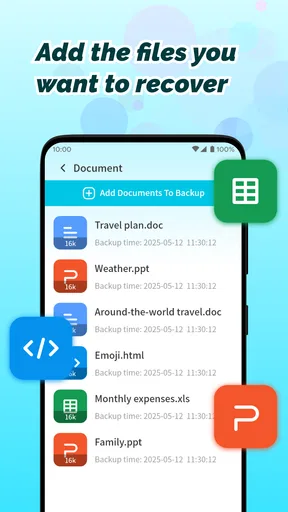
What’s great is that it doesn’t just stop at photos. The "File Recovery" option extends the app’s capabilities to documents, videos, and even audio files. So whether you’ve accidentally deleted a work document or that video from last summer’s road trip, you’re covered.
Making recovery useful in an ordinary week
Imagine clearing space after a family gathering and accidentally removing a picture you meant to keep. I would stop tidying, open the photo scan, and look through the results while the deletion is still recent. If the result list contains many unfamiliar images, I would check them patiently rather than restoring everything. Picking only what I recognize keeps the recovery task manageable and avoids turning a quick rescue into another round of sorting.
For work, the broader file option may be more relevant than the photo-focused one: a misplaced document or recording can matter more than an old camera image. Still, a phone recovery app should not be the only copy of a file that is essential for a deadline. I would treat it as a possible last resort, then move any successfully recovered item somewhere safer and confirm that it opens before relying on it.
A small but important workflow choice is to decide where recovered items should go before starting. If they are restored to the same device, keep enough free space for them and avoid immediately filling that space with new downloads. After recovery, open the files individually and make a separate backup of the ones that matter. That final check is easy to skip when the relief of seeing a missing image takes over.
For iPhone and Android users alike, platform support makes the app broadly approachable, but recovery behavior can depend on the device and its storage setup. The minimum operating system is Android 6.0. I would check that my phone meets the requirement and that the storage I care about is actually accessible to the app before counting on a scan, especially if the missing item was on removable storage rather than the phone itself.
Deep Scanning for the Win
Now, the "Deep Scan" feature is where the app really shines. This isn’t just a surface-level scrub; it dives deep into your device’s memory to unearth files you thought were long gone. I ran a deep scan, and to my surprise, it dug up images I hadn’t seen in ages. The process took a bit longer, as expected, but the results were worth the wait.
I would save a deep scan for cases where a quick photo search does not turn up the file, rather than using the most thorough option automatically every time. That makes the tool feel less like a daily maintenance app and more like an emergency drawer: useful when a particular loss justifies the wait, unnecessary when everything is already where it should be. It also helps keep expectations realistic, because an older image appearing in results does not mean every old deletion will be recoverable.
Before starting a longer scan, I would make sure the phone has enough battery and leave it somewhere I can check on it. I would avoid treating the phone as a guaranteed hands-off recovery machine, especially if I need it for navigation or calls. The practical trade-off is simple: a deeper search may be worthwhile when the missing file matters, but convenience matters too, and not every lost item is worth a lengthy search.
Performance and Reliability
Throughout my testing, the app ran smoothly with no crashes or glitches. It’s lightweight and doesn’t hog your device’s resources, which is a huge plus. I’ve tried other recovery apps before, and they often slow down everything else, but not this one.
That smooth experience helps in a stressful moment, but recovery tools are not substitutes for prevention. For photos I could not afford to lose, I would keep a separate backup routine rather than waiting for an accidental deletion to reveal a gap. Cloud photo libraries and computer backups are better for ongoing protection because they preserve copies before a mishap; a recovery scan is more of a second chance after the fact.
The app is also not the right answer when a file was never stored on the phone, when a backup is the quickest route, or when a damaged device cannot be used normally. In those situations, checking the relevant cloud service, computer, or removable card directly may be more sensible. I would not keep installing multiple recovery apps and running scan after scan on the same device: that adds hassle and can introduce new data without making the original file more recoverable.
One of the highlights is the app’s ability to recover files from both internal and external storage. So if you’ve got files hidden away on an SD card, Photo Recovery-File Recovery has your back.
What keeps it useful after the first rescue
After the novelty of a first scan fades, I do not see this as something that needs a place in my daily routine. Its recurring value is more modest and more practical: it is worth having available if I occasionally delete something important and want to make one careful recovery attempt. That is a sensible role for a focused tool, but it is different from the steady protection offered by a backup service.
The app is a good fit for someone who wants a straightforward recovery option on hand, especially if they regularly manage photos and other files on a phone and are comfortable checking scan results themselves. It is less suitable for a person who expects a guaranteed restore button, needs dependable long-term archiving, or wants to avoid making choices about which results are worth keeping. In those cases, a backup-first approach is the better everyday solution.
There is also a maintenance trade-off: keeping a recovery app installed costs little attention when it is not in use, but it cannot replace periodically checking that important photos are backed up and that those backups can be opened. I would use it when there is a specific missing file to find, then return to ordinary storage habits. That keeps the app in its proper role instead of letting the mere presence of a recovery tool create false confidence.
Final Thoughts
In the world of recovery apps, Photo Recovery-File Recovery stands out with its ease of use, reliable performance, and comprehensive scanning capabilities. Whether you’re tech-savvy or not, this app makes file recovery accessible to everyone. It’s like a safety net for all the precious data on your phone.
So, if you’re prone to accidental deletions or just want a reliable recovery tool in your arsenal, I’d definitely recommend giving this app a try. You never know when you might need to play hero for your lost files.
My lasting verdict is that I would keep it as a backup option, not as a reason to stop making backups. When a recent deletion catches you off guard, its clear recovery paths make a reasonable first step; when you need guaranteed preservation, a separate copy is the wiser habit. Used with those expectations, this free app can earn its space without pretending to make lost data risk-free.
Pros
- Easy-to-use interface for quick navigation.
- Supports a wide range of file formats.
- Recovers photos from both internal and SD storage.
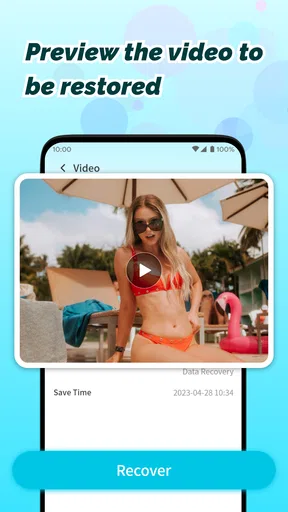
- Preview feature before recovery saves time.
- No root access needed for basic recovery.
Cons
- Limited free recovery options available.
- In-app ads can be intrusive at times.
- Deep scan feature can be slow.
- Some recovered files may be corrupted.
- Premium version is relatively expensive.
FAQs for Photo Recovery-File Recovery
What types of files can Photo Recovery-File Recovery retrieve?
Photo Recovery-File Recovery is designed to recover a wide range of file types, including images, videos, audio files, and documents. The app supports common file formats such as JPEG, PNG, MP4, MP3, DOCX, and PDF, ensuring that users can restore important files lost due to accidental deletion or device formatting.
Is Photo Recovery-File Recovery safe to use on my device?
Yes, Photo Recovery-File Recovery is safe to use. The app does not access or misuse personal data, and it operates within the permissions you grant. It focuses solely on scanning and recovering deleted files, ensuring that users’ privacy and security are maintained throughout the recovery process.
How effective is the recovery process with Photo Recovery-File Recovery?
The effectiveness of the recovery process with Photo Recovery-File Recovery depends on several factors, including how recently the files were deleted and whether new data has overwritten them. The app employs advanced algorithms to maximize recovery potential, but results can vary. Generally, the sooner you attempt recovery after deletion, the better the chances.
Does Photo Recovery-File Recovery require rooting or jailbreaking my device?
No, Photo Recovery-File Recovery does not require rooting or jailbreaking your device. It is designed to work on standard Android and iOS devices without needing any modifications. This makes the app accessible and straightforward for all users, keeping your device’s warranty intact and avoiding potential security risks.
What are the system requirements for installing Photo Recovery-File Recovery?
Photo Recovery-File Recovery is compatible with most Android and iOS devices. For Android, it typically requires version 5.0 or higher, and for iOS, version 11.0 or later. It’s a lightweight app, so it doesn’t require significant storage space, making it easy to install and use on a wide range of devices without performance issues.


